welcome


  • 首页

  • 归档

  • 标签

  • 关于

  • 周易

  • 搜索

MFC 总结

发表于 2018-06-25

更换按钮caption

1
2
this->GetDlgItem(IDC_BT_WAIT)->SetWindowText(L"暂停游戏");
this->GetDlgItem(IDC_BT_WAIT)->SetWindowText(L"继续游戏");

使按钮处于非点击状态

1
this->GetDlgItem(IDC_BT_NORMAL_SET)->EnableWindow(false);

如何判断拐点

1
2
3
4
5
6
7
8
9
10
11
12
//利用等差数列
bool CGameLogic::IsCorner()
{
if (m_nVertTexNum >= 3)
{
if ((m_avPath[m_nVertTexNum - 1] + m_avPath[m_nVertTexNum - 3]) / 2 != m_avPath[m_nVertTexNum - 2])
{
return true;
}
}
return false;
}

深度优先搜索,核心算法

1
2
3
4
5
6
7
8
9
10
11
12
13
14
15
16
17
18
19
20
21
22
23
24
25
26
27
28
29
30
31
32
33
34
35
36
37
38
39
40
41
42
43
44
45
46
47
bool CGameLogic::SearchPath(CGraph &g ,int nV0,int nV1)
{
//得到顶点数
int nVexNum = g.GetVertNum();

//遍历途中nV0行,从0列到nVexMax列,值为true的点
for (int nVi = 0; nVi < nVexNum; nVi++)
{
if (g.GetArc(nV0, nVi) == true && !IsExit(nVi))
{
//压入当前点,假设为路径的一个有效顶点
PushVertTex(nVi);
if (m_nCornerNum > 2)
{
PopVertTex();
continue;
}

//当中间点不是nV1时,继续搜寻下一个相邻且连通的点
if (nVi != nV1)
{
//当中间点不为空时,表示该路径不通
if (g.GetVertex(nVi) != BLACK)
{
//取出压入点
PopVertTex();
continue;
}

//如果nV1是一个已经消除的点,则判断(nV1和nV1)是否连通
if (SearchPath(g, nVi, nV1))
{
//为true表示找到一条连通路径
return true;
}
}
//搜索到终点
else
{
return true;
}
PopVertTex();
}
}

return false;
}

进度条的使用

1
2
3
4
5
6
7
//初始进度条
m_gameProcess.SetRange(0, 5 * 60);
//设置步长
m_gameProcess.SetStep(-1);
//初始值
m_gameProcess.SetPos(300);
this->SetTimer(12,1000,NULL);
1
2
3
4
5
6
7
8
9
10
11
12
13
void CGameDlg::OnTimer(UINT_PTR nIDEvent)
{
if (nIDEvent == 12)
{
int pos=m_gameProcess.GetPos();
drawFont(pos);
//m_time--;
//m_gameProcess.SetPos(pos - 1);
m_gameProcess.StepIt();
}

CDialogEx::OnTimer(nIDEvent);
}

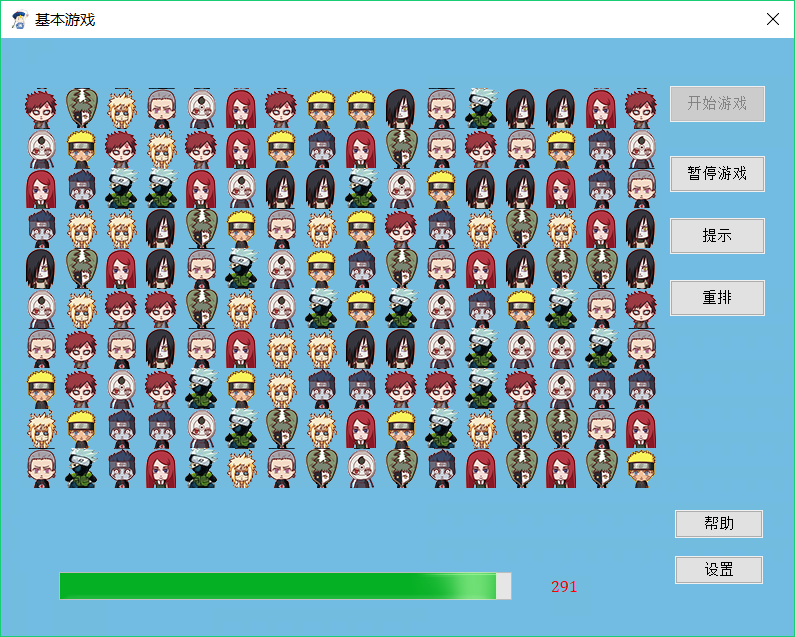
效果

时间复杂度

发表于 2018-06-16

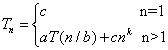
大小为n的原问题分解为a个大小为n/b的子问题,cn^k是合并子问题需要的工作量:

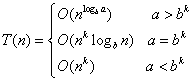
时间复杂度为:

MFC贪吃蛇

发表于 2018-06-13

窗口大小

1
2
3
4
5
6
//添加到OnInitDialog函数中去
GetWindowRect(window);//
GetClientRect(client);//
int width = window.Width() - client.Width() + LENGTH * SIZE_H;
int height = window.Height() - client.Height() + LENGTH * SIZE_H;
MoveWindow(0, 0, width, height);

计时器

打开某个类类向导,添加消息,OnTimer编辑代码,写入按照计时器运行的内容

1
2
3
4
5
6
7
8
9
10
11
12
13
14
15
16
17
18
19
20
21
22
23
24
25
26
27
28
void CSnake2Dlg::OnTimer(UINT_PTR nIDEvent)
{
switch (nIDEvent)
{
case 1: //定时器1处理函数,定时发送数据进行更新
{
snakeMove();
break;
}

case 2: //定时器2位为状态栏时间信息
{
snakeMove();
break;
}
}

CDialogEx::OnTimer(nIDEvent);
}


//开始1号计时器
SetTimer(1, 200, NULL);

//结束1号计时器
KillTimer(1);

按键控制

类向导->虚函数->pretranslate实现控制

1
2
3
4
5
6
7
8
9
10
11
12
13
14
15
16
17
18
19
20
21
22
23
24
25
26
27
28
BOOL CSnake2Dlg::PreTranslateMessage(MSG* pMsg)
{
if (pMsg->message == WM_KEYDOWN)
{
switch (pMsg->wParam)
{
case VK_UP:
m_snake.dirctionChange(CPoint(0,-1));
break;
case VK_DOWN:
m_snake.dirctionChange(CPoint(0, 1));
break;
case VK_LEFT:
m_snake.dirctionChange(CPoint(-1, 0));

break;
case VK_RIGHT:
m_snake.dirctionChange(CPoint(1, 0));

break;

default:
break;
}
}

return CDialogEx::PreTranslateMessage(pMsg);
}

链表

1
2
3
4
5
6
7
8
9
10
CList <CPoint> body;//链表类型
body.GetHead();//得到头节点
body.GetTail();//得到尾节点
body.GetHeadPosition();//返回位置

body.Add
POSITION p;//感觉有点向迭代器

//得到下一个节点
CPoint point =body.GetNext(p);

画矩形

1
2
3
4
CClientDC dc(this);
CBrush red(RGB(255, 0, 0));
dc.SelectObject(red);
dc.Rectangle(m_ptFood.x*LENGTH, m_ptFood.y*LENGTH, (m_ptFood.x + 1)*LENGTH, (m_ptFood.y + 1)*LENGTH);

画直线

1
2
3
4
5
6
7
8
CClientDC dc(this);
CPen pen;

pen.CreatePen(PS_SOLID, 1, RGB(0, 0, 0));
CPen *oldPen = dc.SelectObject(&pen);
dc.MoveTo(0, 0);//起点
dc.LineTo(0, 600);//终点
dc.SelectObject(oldPen);

OnPaint

什么时候调用?
1、由其他窗口遮挡、移动窗口等动作的时候系统会发送
2、你自己想更新某个区域可以发送Invalidate或InvalidRect,再加上UpdateWindow()也可以触发

设计思想

1、建立一个对话框
2、创建Point类型变量代表食物,并且作为对话框的成员变量
3、随机生成食物,绘制食物
4、建立蛇类,作为对话框类的成员
5、添加蛇类CList成员变量,以及代表方向CPoint成员变量
  (CPoint类型的坐标含义为到下一方向作加法,(0,-1)代表纵坐标减1,即向上移动)
6、添加碰撞检测(比较两个点是否相同)
7、重绘蛇和食物

遇到的bug

1、消除边界
原因:消除蛇尾巴的时候清除
纠正方法:重画边界

2、蛇撞到自己的身体
原因:按键速度和蛇移动速度不匹配
纠正方法:当按下键的时候,键盘控制蛇移动,其他时候定时器控制

3、按键一直咚咚咚亮
改正方法:

1
return CDialogEx::PreTranslateMessage(pMsg);

换成

1
return false;

学习于:kekehui

快速排序

发表于 2018-06-13
1
2
3
4
5
6
7
8
9
10
11
12
13
14
15
16
17
18
19
20
21
22
23
24
25
26
27
28
function quickSort
a = [2,0,1,8,6,13];
num=size(a,2);
c = quickSort1(a,1,num);
disp(c);
end

function a=quickSort1(a,aStart,aEnd)
if aStart >= aEnd
return ;
end
index = a(aStart);
i = aStart,j = aEnd;
while i<j
while a(j)>=index && i<j
j=j-1;
end
a(i)= a(j);
while a(i)<=index && i<j
i=i+1;
end
a(j)= a(i);
end
a(i) = index;
a=quickSort1(a,aStart,i-1);
a=quickSort1(a,i+1,aEnd);

end

感觉更为简洁

1
2
3
4
5
6
7
8
9
10
11
12
13
14
15
16
17
18
19
20
21
22
23
24
25
26
27
28
29
30
31
32
33
34
35
36
37
38
39
40
41
42
43
44
45
46
47
48
49
#include<stdio.h>

void swap(int *a, int *b)
{
int t = *a;
*a = *b;
*b = t;
}

void quickSort(int a[], int aStart, int aEnd)
{
if (aStart >= aEnd)
{
return;
}
int midvalue = a[aEnd];
int i = aStart - 1;
for (int j = aStart; j <= aEnd-1; j++)
{
if (a[j] <= midvalue)
{
i++;
swap(&a[j],&a[i]);
}
}
swap(&a[i+1], &a[aEnd]);

quickSort(a, aStart, i + 1 - 1);
quickSort(a, i + 1 + 1, aEnd);
}

void printArray(int a[], int n)
{
for (int i = 0; i < n; i++)
{
printf("%d\t", a[i]);
}
printf("\n");
}

int main()
{
int a[] = { 1,4,3,2 };
int n = sizeof(a) / sizeof(a[0]);
printArray(a, n);
quickSort(a, 0, n - 1);
printArray(a, n);

}

批量更改图片大小

发表于 2018-06-09
1
2
3
4
5
from PIL import Image

img = Image.open("cat.bmp")
new_img = img.resize((40,40))
new_img.save("cat.bmp", "BMP", optimize=True)

文件重命名

发表于 2018-06-05

多个文件重命名

1
2
3
4
5
import os
i=1
for file in os.listdir("."):
os.rename(file,"img"+str(i)+".bmp")
i=i+1

PS: windows 防火墙会阻止脚本文件更改文件名,所以要关闭

查找文档内容

发表于 2018-06-05
1
2
3
4
5
6
7
import  os
target = input("please input the search word:")
for filename in os.listdir("."):
if "." in filename:
with open (filename,'r',encoding='UTF-8') as f:
if target in f.read():
print(os.path.basename(filename))

《无声告白》

发表于 2018-06-01

好压抑的一本书
知道为什么封面有一句话了

我们终此一生,就是要摆脱他人的期待,找到真正的自己。


大大的剧透。

另外,想用图片的话,文件名最好用英文。
图片来自网络。

《连连看》- 位图、文字输出

发表于 2018-05-28

显示文字


1
2
3
4
5
6
7
8
9
10
11
12
13
14
15
16
17
18
19
20
21
22
23
24
25
26
void CLLKDlg::OnPaint(){
CPaintDC dc(this);

//创建字体
CFont font;
font.CreatePointFont(200, L"Cambria");
CFont * oldFont;
oldFont = dc.SelectObject(&font);

//设置字体颜色
dc.SetTextColor(RGB(0, 0, 255));

//获取字体位置
CRect rect;
GetClientRect(&rect);

//字体内容
CString strText = L"Welcom to LLK-GAME!";
CSize size;
size = dc.GetTextExtent(strText, strText.GetAllocLength());

//居中显示
int x = (rect.Width() - size.cx) / 2;
int y = (rect.Height() - size.cy) / 2;
dc.TextOut(x, y, strText);
}


显示位图


1
2
3
4
5
6
7
8
9
10
11
12
13
14
15
16
17
18
19
20
21
void CLLKDlg::OnPaint(){
//额外添加在自动生成的else里面
CPaintDC dc(this);

//将内存DC复制到视频DC,内存DC在头文件类中定义
dc.BitBlt(0, 0, 800, 600, &m_DCMem, 0, 0, SRCCOPY);
}

//此函数为自定义函数,在头文件中添加
void CLLKDlg::InitBackground() {
//加载位图
CBitmap bmpmain;
bmpmain.LoadBitmap(IDB_MAIN_BG);

//创建兼容dc
CClientDC dc(this);
m_DCMem.CreateCompatibleDC(&dc);

//将位图选进dc
m_DCMem.SelectObject(&bmpmain);
}

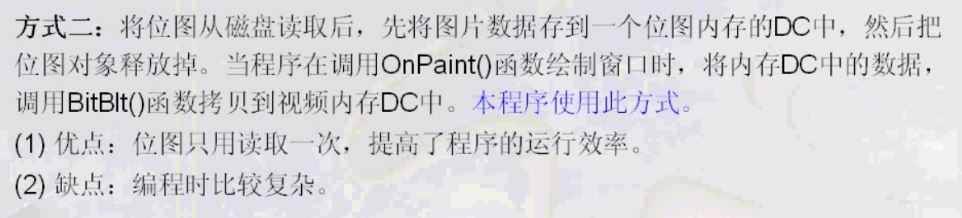
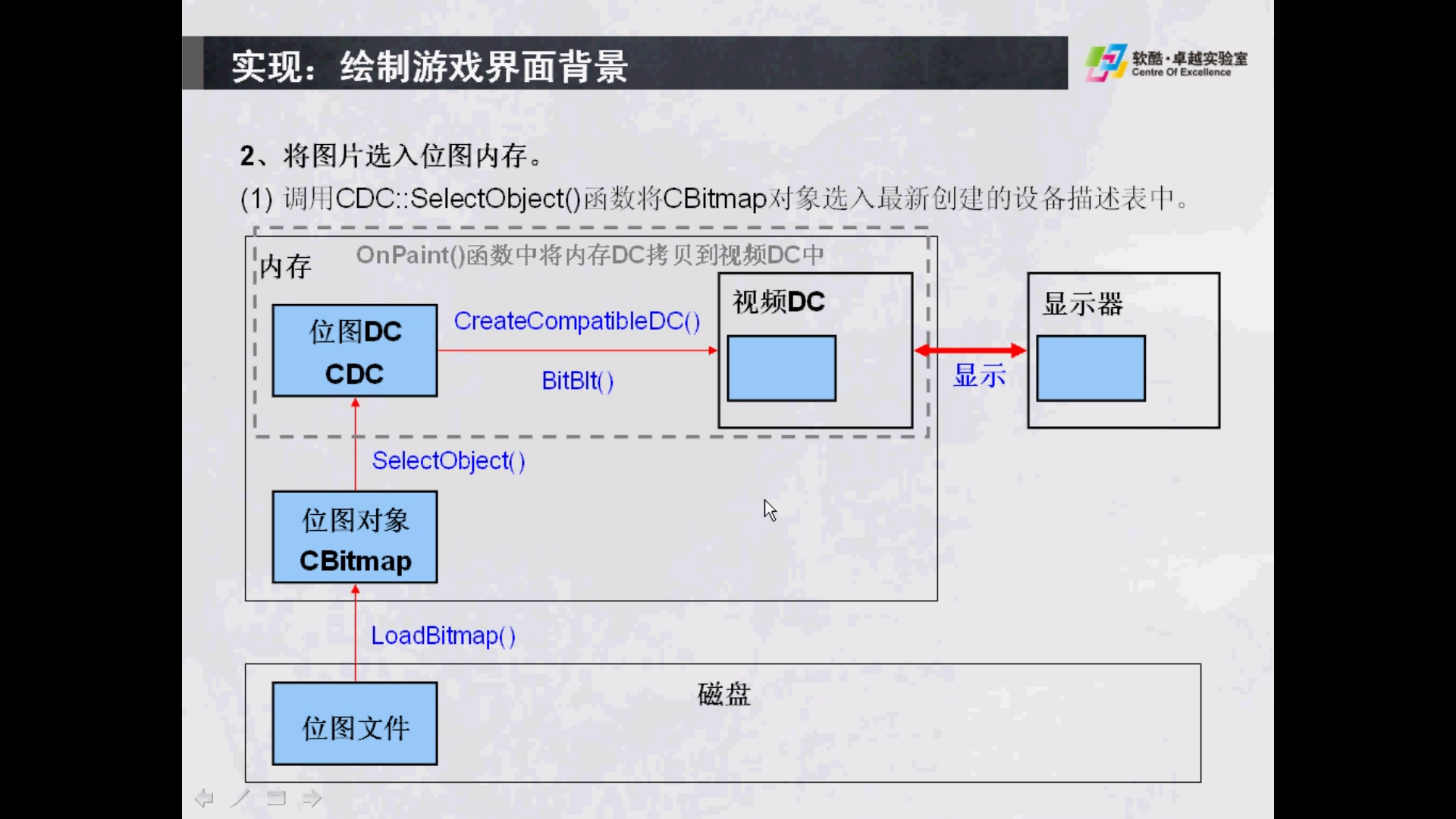
以下方式能完成功能
1、保存背景图片在m_dcBG
2、以后可以利用m_dcBG完成对m_dcMem的刷新,进而刷新视频dc
发现m_dcMem和m_dcBG是为同一个视频dc创建的兼容dc

1
2
3
4
5
6
7
8
9
10
11
12
13
14
15
16
17
18
19
20
21
22
23
24
25
26
27
28
29
30
31
32
33
34
35
36
37
38
39
40
41
42
43
44
45
46
void CGameDlg::InitBackground() {
//::是调用API,加载位图

//获得当前视频dc
CClientDC dc(this);

//加载bmp图片
HANDLE bmp = ::LoadImage(NULL, _T("res\\theme\\picture\\game_bg.bmp"), IMAGE_BITMAP, 0, 0, LR_LOADFROMFILE);

//创建与视频内存兼容DC
m_dcBG.CreateCompatibleDC(&dc);

//将位图资源选进DC
m_dcBG.SelectObject(bmp);

//初始化内存DC
m_dcMem.CreateCompatibleDC(&dc);
CBitmap bmpMem;
bmpMem.CreateCompatibleBitmap(&dc,800,600);
m_dcMem.SelectObject(bmpMem);

//绘制背景到内存中
m_dcMem.BitBlt(0, 0, 800, 600, &m_dcBG, 0, 0,SRCCOPY);
}

void CGameDlg::UpDateMap()
{
int nTop = m_ptGameTop.y;
int nLeft = m_ptGameTop.x;
int nElemW = m_sizeElement.cx;
int nElemH = m_sizeElement.cy;

m_dcMem.BitBlt(m_rtGameRect.left, m_rtGameRect.top, m_rtGameRect.Width(), m_rtGameRect.Height(), &m_dcBG, m_rtGameRect.left, m_rtGameRect.top, SRCCOPY);

for (int i = 0; i < 4; i++)
{
for (int j = 0; j < 4; j++)
{
if (m_anMap[i][j] != -1)
{
m_dcMem.BitBlt(nLeft + j * nElemW, nTop + i * nElemH, nElemW, nElemH, &m_dcElement, 0, m_anMap[i][j] * nElemH, SRCCOPY);
}
}
}

}

另外注意利用vs2017加载资源文件时有可能在文件中看不到bmp文件,此时把列表中文件类型改为所有文件即可。

MFC 下拉列表

发表于 2018-05-28

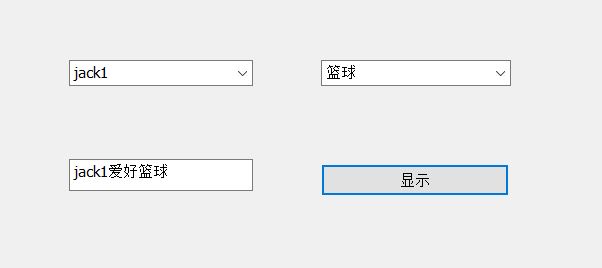
   利用mfc要完成效果如图:


  • 创建mfc工程,选择对话框项目,选择资源文件的xxxx.rc2,进入后选择dialog,之后利用添加控件combobox
  • 右键控件,添加变量m_cbox
  • 添加控件Item,在OnInitDialog()中添加:

    1
    2
    m_cList1.AddString(L"jack1");
    m_cList1.AddString(L"jack2");

    或者直接在属性中data中添加,注意两个变量间要以;(分号)隔开

  • 获取变量内容:

    1
    2
    CString msg;
    m_cList1.GetLBText(m_cList1.GetCurSel(), msg);

    msg 是一个全局变量用于传递消息

  • button 设置显示内容:

    1
    2
    3
    UpdateData(TRUE);
    m_edit = msg+L"爱好"+msg2;
    UpdateData(FALSE);
  • Done

&nbsp ;&emsp ; 为空格,.=_=.(去掉分号与字母间的空格才可以)

12…6
weihuan

weihuan

55 日志
11 标签
© 2026 weihuan
由 Hexo 强力驱动
主题 - NexT.Muse